

A student can't access an app. A teacher needs a password reset. A principal wants to confirm which groups a user belongs to.
These are often building-level support issues, but resolving them may still require help from the district team. The challenge has been giving school leaders enough access to handle routine requests without granting them visibility or control across the entire district.
ClassLink’s Building-Level Restrictions make that possible. ClassLink Administrators can assign powers such as Impersonation or Password Reset to building leaders and automatically limit those powers to their assigned school or schools.
A principal can impersonate students or staff to troubleshoot an issue, but only within their assigned building. School staff can reset passwords. Authorized leaders can review group membership without seeing users from other buildings.
No hand-picked user lists. No ongoing security role maintenance. Actions are also recorded in ClassLink audit logs, giving district teams visibility into how delegated access is being used.
Practical Uses Across Your District
Help building tech coordinators troubleshoot in the moment
When students or staff report that an app isn’t working, a designated school leader can impersonate their experience to see the issue firsthand.
Access is limited to the students and staff at their assigned school. They can’t search or impersonate anyone from another building.
As enrollment and staff assignments change, access updates automatically based on roster data. There is no custom user list to maintain.
Move password resets closer to the classroom
A forgotten password should not always require a district-level support ticket.
Campus office staff or other authorized employees can reset passwords for users at their own school without receiving districtwide access.
District admins configure one security role, enable restrictions, and apply that role to selected leaders without giving anyone systemwide access.
Review Group Membership
Users assigned to groups can affect application access, permissions, and other school workflows.
Authorized leaders can view the groups associated with students and staff at their school to help confirm whether they are placed in the correct groups and troubleshoot access issues more efficiently.
Support leaders responsible for multiple schools
Some administrators support more than one building.
A leader assigned to both a middle school and a high school can work with students and staff from either organization through the same role and interface. They can filter between their assigned schools without needing separate roles, accounts, or tools.
Maintain Visibility Through Audit Logs
Delegating support responsibilities doesn't mean giving up oversight.
All activity is tracked in logs, so district administrators can review actions taken through assigned powers. District teams can see who performed an action, what they did, and when it happened.
Building leaders get the access they need to solve everyday issues, while district administrators maintain accountability and visibility.
Set up Building-Level Restrictions
Permissions are configured in Security Roles and can be restricted by Profile, Group, or Roster Server setup.
- Open or create a role in Security Roles.
- Add a power, such as Impersonation or Password Reset.
- Next, an admin should assign the Groups and Users app to the delegated users who received powers in the previous step.
When using the Roster Server restriction, admins can be a bit more granular with access control by selecting or deselecting role types.
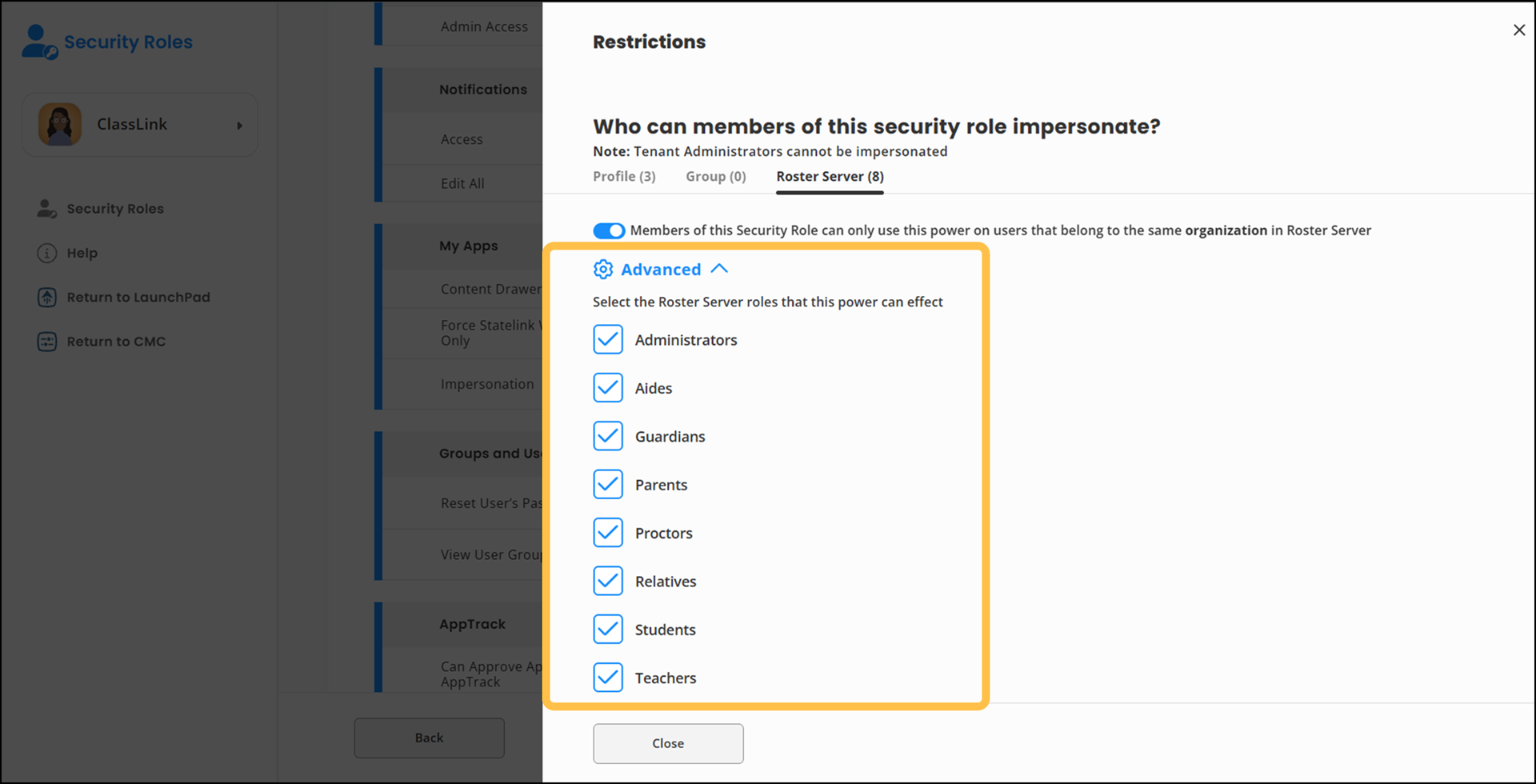
Once configured, building leaders will see rostered users from their assigned school or schools in the Groups & Users app. Those leaders can only perform the specific actions granted through their security role.
The result is a simpler way to move routine support closer to the school while keeping access aligned with systemwide security policies.
Available Now
Building-Level Restrictions currently support:
- Impersonation
- Password Reset
- View User Groups
MFA Reset, Password Recovery Reset, QuickCards, and Notifications are additional powers coming soon.